 ██████╗ ██████╗███╗   ███╗██╗   ██╗██╗  ██╗
██╔════╝██╔════╝████╗ ████║██║   ██║╚██╗██╔╝
██║     ██║     ██╔████╔██║██║   ██║ ╚███╔╝
██║     ██║     ██║╚██╔╝██║██║   ██║ ██╔██╗
╚██████╗╚██████╗██║ ╚═╝ ██║╚██████╔╝██╔╝ ██╗
 ╚═════╝ ╚═════╝╚═╝     ╚═╝ ╚═════╝ ╚═╝  ╚═╝
a cross-device tmux session manager for AI coding agents
Run your coding agents from any device —
even your phone.
Manage Claude Code, Codex, Cursor, and other coding agents in one terminal dashboard. See which sessions need input, switch projects, and reconnect from another device over Tailscale.
// dashboard
See what’s running. Find what needs you.
Five agents running in parallel across four projects, color-coded by state — active, idle, needs your input. The dashboard updates live as each session moves, and the Devices panel shows every other ccmux-running machine on your tailnet right next to it.

cross-device
Start on a connected host, answer from your phone, and return to the same session on your laptop.
every agent
Claude Code, Codex, Cursor, and more — each project picks one and the whole TUI follows.
keyboard-first
Press Enter on the session you want. No tmux names, no --resume <hash>, no SSH-then-attach.
guided setup
One curl, then ccmux setup. Runs over your tailnet via SSH or Mosh.
// hand-off
Start on your Mac. Continue on your phone. Resume on your laptop.
Reconnect to the work you already started.
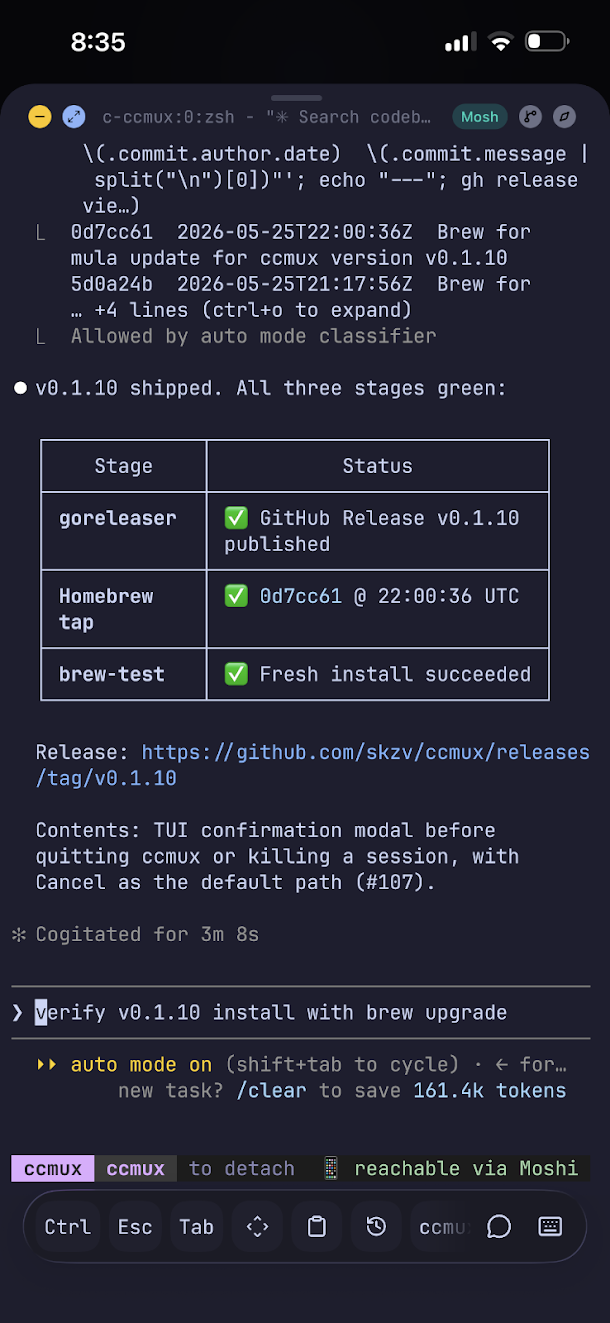
Start a task on an always-on Mac mini or Linux host. The agent runs there while you disconnect and go about your day.
Your phone vibrates: Claude is asking a question. You tap the notification, you're attached. You answer, hit Ctrl-b d, lock the phone.
Tomorrow morning on the train, you open your laptop, type ccmux and select the remote session to pick up where you left off.
// spawn
Spawn from anywhere.
Phone in the kitchen — kick off a new agent session on the Mac at your desk. Open the Projects tab on any device, press n, and pick the host — your local machine or any peer running ccmuxd on your tailnet. The remote daemon creates the directory and starts the agent; ccmux SSH-attaches you in. You never typed ssh.

// conversations
Every conversation. One tap.
ccmux remembers your past Claude / Codex / Antigravity / Cursor / pi / Muse Code threads — sorted by recency, ready to resume. Press 2 for the Conversations screen, Enter on the one you want. The daemon resumes the agent with the right session ID. You don't type claude --resume <hash> ever again.

// keybindings
Pick a session. Press Enter.
Everything is discoverable. Hit ? on any screen for the keymap.
you don't type
you hit
Your sessions run in tmux. Use the dashboard for everyday work and tmux commands whenever you need them.
// agents
Choose an agent for each project.
Each project picks its own agent and remembers it. The dashboard, daemon, and dispatch all follow.

claudecodexagycursor-agentpigrokmuseStored per-project in .ccmux/agent. Default: Claude. Set a different default in config.toml.
// mcp
Your agent can call ccmux as a tool.
Connect your coding agent to the ccmux MCP server to inspect sessions, read project notes, and check usage. Starting sessions and sending keystrokes require an explicit opt-in.
read
- list_sessions
- read_pane
- list_projects
- list_conversations
- get_usage
- list_machines
- read_note · search_notes
act (opt-in)
- spawn_session
- spawn_bare_session
- send_keys
- kill_session
Hidden from tools/list until you pass --allow-mutate.
{
  "mcpServers": {
    "ccmux": { "command": "ccmux-mcp" }
  }
}
An agent on your laptop can read what its sibling on the Mac mini is doing, kick off a helper in another project, pull a result back, and clean up — without you SSH-ing in. Point it at a tailnet peer with CCMUX_HOST=mini:7474.
// dev server
Dev server on the mini, viewed from anywhere.
Start your web app on the host, share its port with Tailscale Serve, and open the printed HTTPS URL on your phone. Both devices must be connected to your tailnet.
on the mini
npm run dev
tailscale serve 3000
on your phone
Safari
→ HTTPS URL
on the laptop
Browser
→ same HTTPS URL
Use the port your dev server prints; 3000 is an example. See the phone preview guide for HTTPS setup and allowed-host configuration.
// more
And a few more things ccmux quietly handles.
Reactive features that show up when you need them and stay out of the way when you don't.
moshi-hook.02Sleep controlsControl when the host stays awake. The default macOS mode works on AC power; lid-close behavior requires separate configuration.03Auto-discoveredInstall ccmux on a new device and it shows up on every other device on your tailnet within seconds — no host config.04Terminal-native notesEvery .md file in the project tree, grouped by folder, rendered in pane. Ripgrep search. No sync service.05Attaches over SSH or MoshReach any machine on your tailnet over plain ssh, or pin a host with mosh so the connection survives roaming and lid-close. Auto-detected per host.06Guided setupccmux setup is an interactive wizard that checks tmux / mosh / tailscale and offers to install whatever's missing. ccmux doctor verifies it.Common questions
What does ccmux add to tmux?
tmux keeps terminal sessions running after you detach. ccmux adds a dashboard for coding agents, project navigation, conversation history, and remote session discovery. Learn how to manage multiple sessions.
Do the agents run on my phone?
Agents run on your Mac or Linux host. Your phone connects to that host through a terminal client; the host must stay awake and online. Set up mobile access.
Do I need Tailscale for local sessions?
You can manage sessions on one machine locally. Tailscale connects your devices for remote discovery and access. Connect a second machine.
Does ccmux include an AI subscription?
ccmux is free to download. Install and sign in to your chosen coding agent separately; that provider’s subscription or API charges still apply. Check the installation requirements.
Help improve ccmux
Found a bug, an unclear guide, or a translation that could read better? Contributions of any size are welcome. Open an issue or send a pull request.
// never stop shipping.
Try it on your machine
v0.5.0 is out. macOS, Linux, or Windows via WSL2 — one curl and you're in. Homebrew works too.